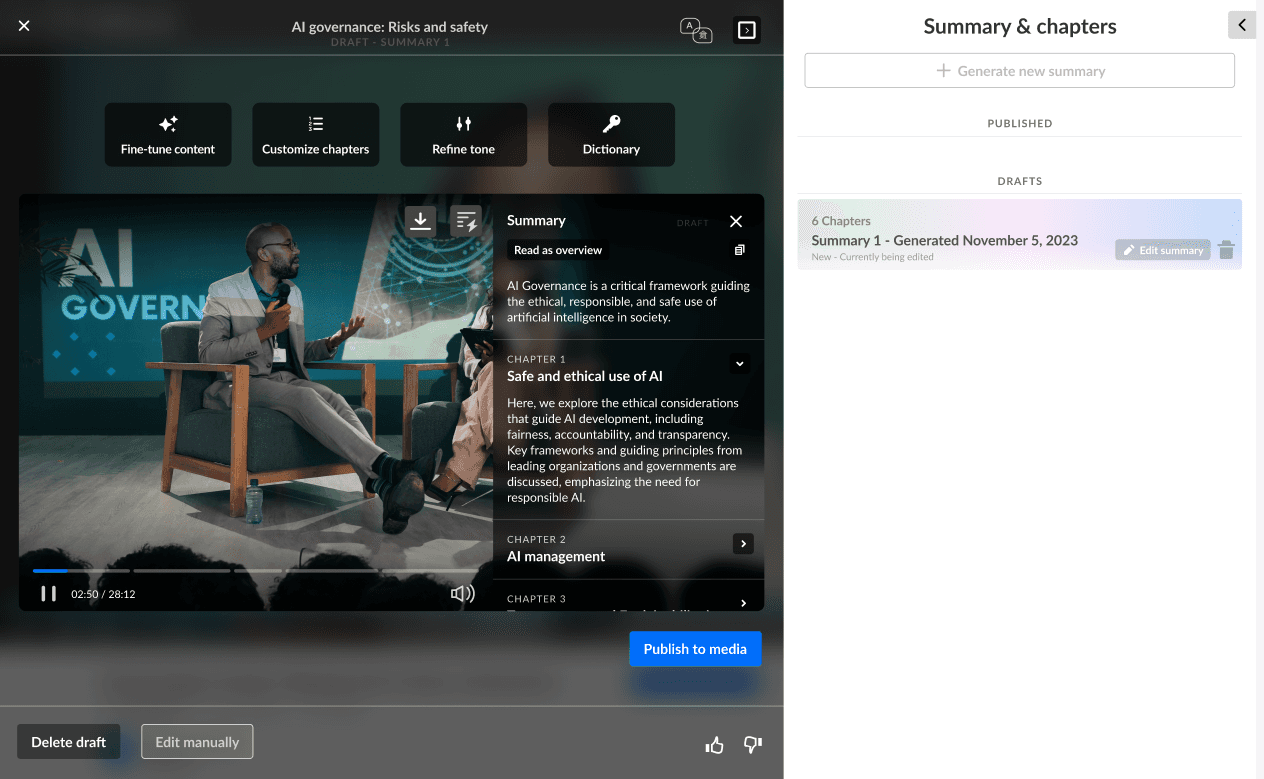
During my internship at Kaltura, I led a team of fellow students as part of the product team. We worked on an AI powered feature that breaks long videos into chapters with short contextual summaries to help users navigate and discover content more easily. The feature is part of Kaltura’s larger video platform used by enterprises and universities.

My Role: Product Designer
Tools: Figma, AI Tools, Dovetail
During my internship at Kaltura, I led a team of fellow students as part of the product team. We worked on an AI powered feature that breaks long videos into chapters with short contextual summaries to help users navigate and discover content more easily. The feature is part of Kaltura’s larger video platform used by enterprises and universities.
My Role: Product Designer
Tools: Figma, AI Tools, Dovetail
Jump to Results
Role: Product Designer
Tools: Figma, AI Tools, Dovetail
During my internship at Kaltura, I led a team of fellow students as part of the product team. We worked on an AI powered feature that breaks long videos into chapters with short contextual summaries to help users navigate and discover content more easily. The feature is part of Kaltura’s larger video platform used by enterprises and universities.
The Problem
Users had difficulty navigating long videos and finding relevant content quickly. The platform lacked tools to easily summarize or break videos into parts.
The Challenge
Understand user needs and design a solution that adds real value without overwhelming them. The goal was to introduce AI-based features in a way that feels intuitive, simple, and helpful.
The Problem
Users had difficulty navigating long videos and finding relevant content quickly. The platform lacked tools to easily summarize or break videos into parts.
The Challenge
Understand user needs and design a solution that adds real value without overwhelming them. The goal was to introduce AI-based features in a way that feels intuitive, simple, and helpful.
🎯 Product Goals
📈 Boost engagement with recorded content
💬 Personalized, relevant messaging
⏱️ Reduce time-to-publish for edited videos
🎯 Product Goals
📈 Boost engagement with recorded content
💬 Personalized, relevant messaging
⏱️ Reduce time-to-publish for edited videos
👥 Persona
Role: Video Editor
Needs: Quickly edit and enhance recorded lectures without missing important moments
Pain Points: Wasting time manually scanning through long videos to find key sections
👥 Persona
Role: Video Editor
Needs: Quickly edit and enhance recorded lectures without missing important moments
Pain Points: Wasting time manually scanning through long videos to find key sections
👥 Persona
Role: Video Editor
Needs: Quickly edit and enhance recorded lectures without missing important moments
Pain Points: Wasting time manually scanning through long videos to find key sections
🔍 User Research Overview
Format
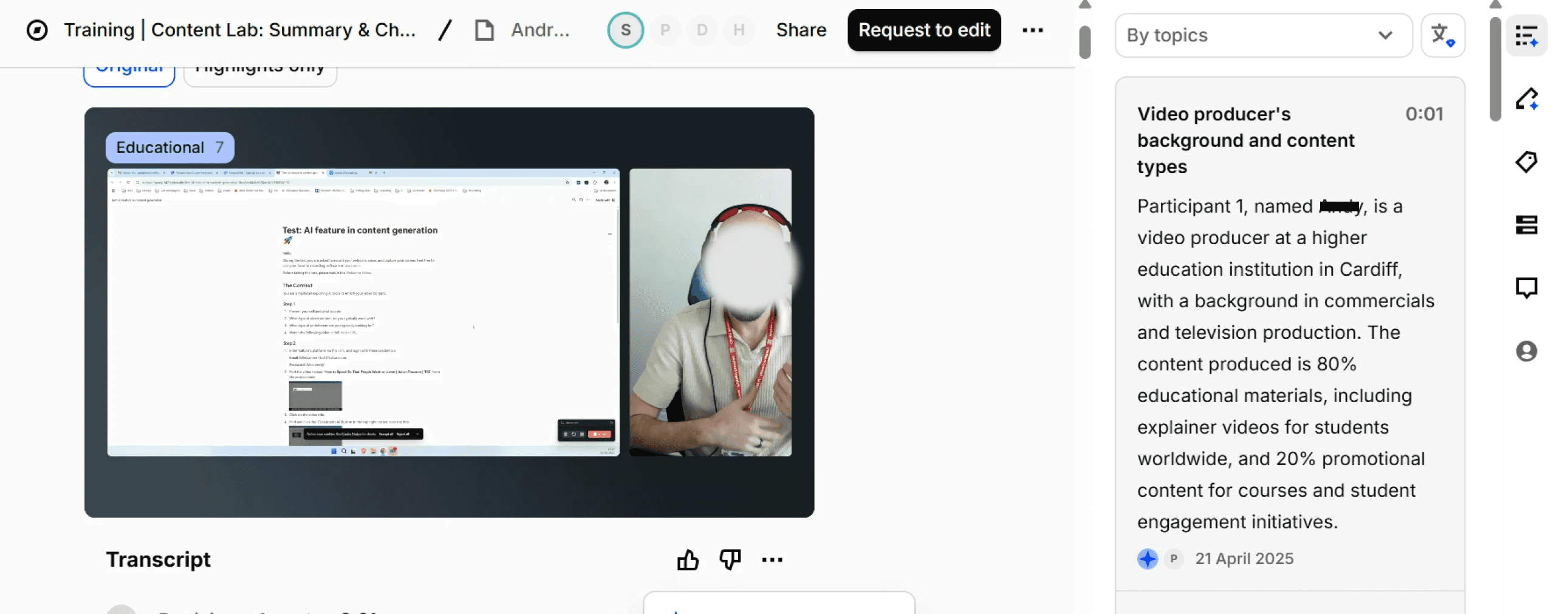
Remote usability testing with real users
10 participants filmed themselves completing a scenario
Tasks were based on real workflows in Kaltura
Analysis done with Dovetail
🔍 What we looked for
Tasks users struggled with
Pain points
Repeated patterns across sessions

🔍 User Research Overview
Format
Remote usability testing with real users
10 participants filmed themselves completing a scenario
Tasks were based on real workflows in Kaltura
Analysis done with Dovetail
🔍 What we looked for
Tasks users struggled with
Pain points
Repeated patterns across sessions
✨
Auto-generate summary and chapters
1
✂️
Edit summary and chapters
2
📤
Publish final output
3
🗑️
Delete draft
4
👣 User journey
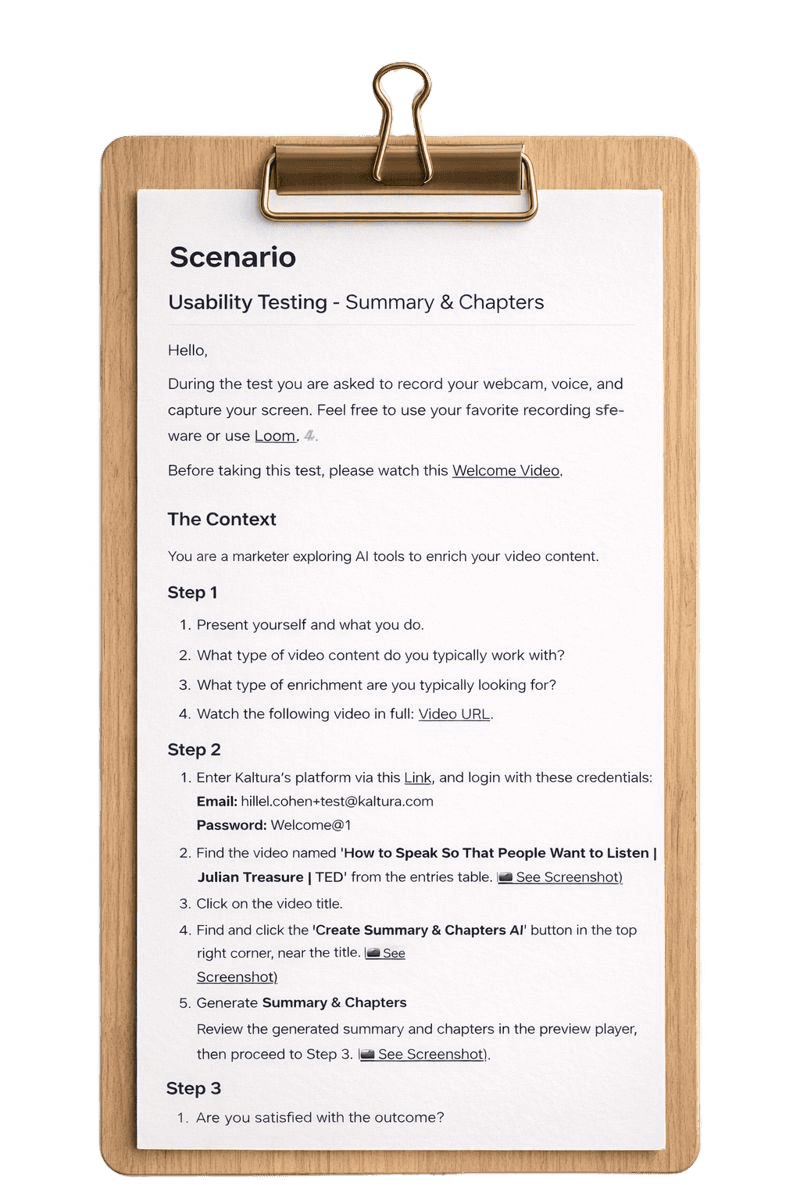
Steps users followed during the usability test
👣 User journey
Steps users followed during the usability test
✨
Auto-generate summary and chapters
1
✂️
Edit summary and chapters
2
📤
Publish final output
3
🗑️
Delete draft
4
👣 User journey
Steps users followed during the usability test
✨
Auto-generate summary and chapters
1
✂️
Edit summary and chapters
2
📤
Publish final output
3
🗑️
Delete draft
4
📖 Competitive research

– Enables speech-based search and automatic chaptering
✅ Learned the importance of easy navigation in long videos. We can improve our experience by adding searchable transcripts.

– AI-based video summaries and captions
✅ Highlights the value of automation in content creation. We could enhance our summaries using smarter AI models.

– Auto-editing with summaries, translations & smart cuts
✅ Shows the need for flexible editing and advanced features. We should consider adding more precise editing controls.

– Professional video management platform with strong UX
✅ Emphasizes the importance of clean, intuitive design. We can improve our publish and preview experience accordingly.
📖 Competitive research
– Enables speech-based search and automatic chaptering
✅ Learned the importance of easy navigation in long videos. We can improve our experience by adding searchable transcripts.
– AI-based video summaries and captions
✅ Highlights the value of automation in content creation. We could enhance our summaries using smarter AI models.
– Auto-editing with summaries, translations & smart cuts
✅ Shows the need for flexible editing and advanced features. We should consider adding more precise editing controls.
– Professional video management platform with strong UX
✅ Emphasizes the importance of clean, intuitive design. We can improve our publish and preview experience accordingly.
📖 Competitive research
Enables speech-based search and automatic chaptering
✅ Learned the importance of easy navigation in long videos. We can improve our experience by adding searchable transcripts.
AI-based video summaries and captions
✅ Highlights the value of automation in content creation. We could enhance our summaries using smarter AI models.
Auto-editing with summaries, translations & smart cuts
✅ Shows the need for flexible editing and advanced features. We should consider adding more precise editing controls.
Professional video management platform with strong UX
✅ Emphasizes the importance of clean, intuitive design. We can improve our publish and preview experience accordingly.
⚠️ Core Problems
Limited Editing Control
Users lacked flexibility when editing chapter structure and draft settings.
“I wish I had more control over the summary."- User feedback
Confusing Navigation
Participants had difficulty locating key features due to unclear layout.
“Took me a minute to find where to delete the draft."- User feedback
AI Limitations vs. Expectations
Users expected more advanced AI help, including smarter suggestions and multilingual support.
“I was expecting smarter suggestions from the AI.”- User feedback
⚠️ Core Problems
Limited Editing Control
Users lacked flexibility when editing chapter structure and draft settings.
“I wish I had more control over the summary."- User feedback
Confusing Navigation
Participants had difficulty locating key features due to unclear layout.
“Took me a minute to find where to delete the draft."- User feedback
AI Limitations
Users expected more advanced AI help, including smarter suggestions and multilingual support.
“I was expecting smarter suggestions from the AI.”- User feedback
Insight 1:
Control Builds Confidence
Users feel more confident when they can easily customize summaries.
Opportunity:
Users feel more confident when they can easily customize summaries.
Insight 2:
Clarity Drives Action
Clear layout helps users act faster and with confidence.
Opportunity:
Improve navigation by refining hierarchy and highlighting key actions like edit, publish, and delete.
Insight 3:
Smart AI = Satisfied Users
Users expect AI to offer smart, helpful suggestions, not just automate.
Opportunity:
Enhance AI with contextual suggestions, multilingual support and smarter content detection.
Insight 1:
Control Builds Confidence
Users feel more confident when they can easily customize summaries.
Opportunity:
Users feel more confident when they can easily customize summaries.
Insight 2:
Clarity Drives Action
Clear layout helps users act faster and with confidence.
Opportunity:
Improve navigation by refining hierarchy and highlighting key actions like edit, publish, and delete.
Insight 3:
Smart AI = Satisfied Users
Users expect AI to offer smart, helpful suggestions, not just automate.
Opportunity:
Enhance AI with contextual suggestions, multilingual support and smarter content detection.
Insight 1:
Control Builds Confidence
Users feel more confident when they can easily customize summaries.
Opportunity:
Users feel more confident when they can easily customize summaries.
Insight 2:
Clarity Drives Action
Clear layout helps users act faster and with confidence.
Opportunity:
Improve navigation by refining hierarchy and highlighting key actions like edit, publish, and delete.
Insight 3:
Smart AI = Satisfied Users
Users expect AI to offer smart, helpful suggestions, not just automate.
Opportunity:
Enhance AI with contextual suggestions, multilingual support and smarter content detection.
🧩 Solutions
Challenge 1: Limited Editing Control
💭 Brainstorm ideas
Add tone customization (formal, casual, etc.)
Enable editing by section or sentence
Allow users to view and restore version history
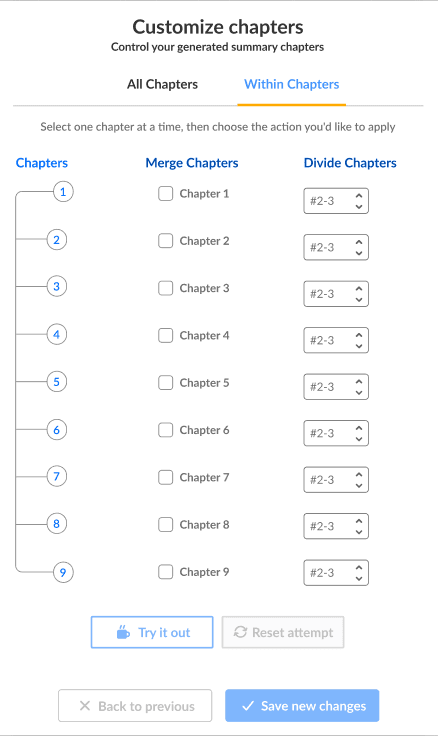
Provide options to merge or split summary chapters
Offer one-click regeneration of specific parts
❌ Not Selected & Why:
Editing by sentence: Too complex and time-consuming
One-click partial regeneration: Hard to control quality and context
👍 Selected Solutions:
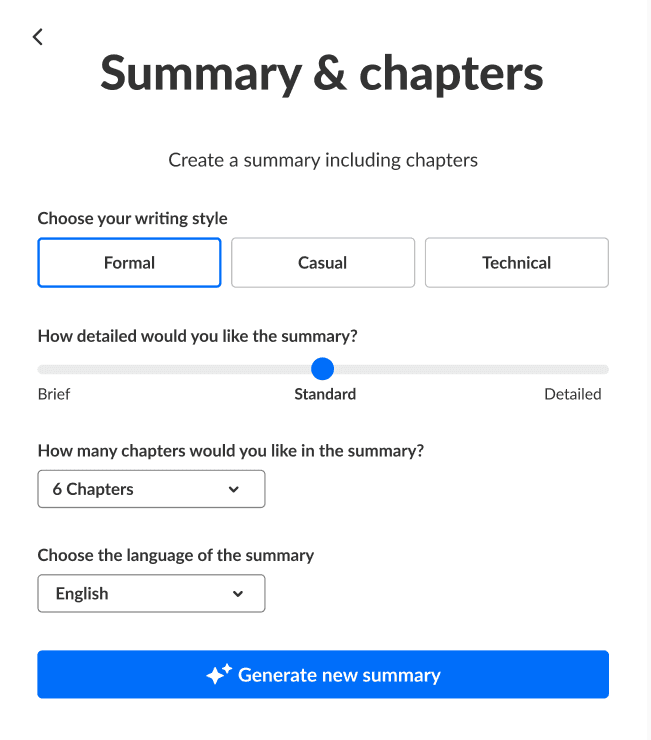
Tone customization
Create a summary including chapters
Choose your writing style
Formal
Casual
Technical
How detailed would you like the summary?
Brief
Standard
Detailed
How many chapters would you like in the summary?
6 Chapters
Choose the language of the summary
English
Generate new summary
Merge/split chapters
🧩 Solutions
Challenge 1: Limited Editing Control
💭 Brainstorm ideas
Add tone customization (formal, casual, etc.)
Enable editing by section or sentence
Allow users to view and restore version history
Provide options to merge or split summary chapters
Offer one-click regeneration of specific parts
❌ Not Selected & Why:
Editing by sentence: Too complex and time-consuming
One-click partial regeneration: Hard to control quality and context
👍 Selected Solutions:
Tone customization
Create a summary including chapters
Choose your writing style
Formal
Casual
Technical
How detailed would you like the summary?
Brief
Standard
Detailed
How many chapters would you like in the summary?
6 Chapters
Choose the language of the summary
English
Generate new summary
Merge/split chapters
🧩 Solutions
👍 Selected Solutions:
Challenge 1: Limited Editing Control
💭 Brainstorm ideas
Add tone customization (formal, casual, etc.)
Enable editing by section or sentence
Allow users to view and restore version history
Provide options to merge or split summary chapters
Offer one-click regeneration of specific parts
❌ Not Selected & Why:
Editing by sentence: Too complex and time-consuming
One-click partial regeneration: Hard to control quality and context
Tone customization
Version history
Merge/split chapters
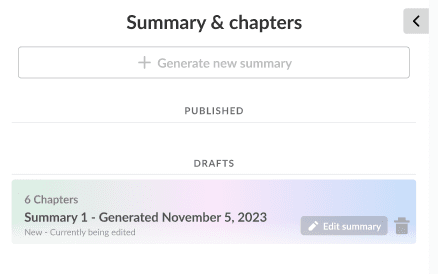
Version history
Summary & chapters
Generate new summary
published
Drafts

6 Chapters
Summary 1 - Generated November 5, 2023
New - Currently being edited
Edit summary
Challenge 2: Confusing Navigation
💭 Brainstorm ideas
Redesign layout with clearer visual hierarchy
Group related actions together (e.g., Edit, Delete, Publish)
Add labels or icons to clarify action buttons
Mute autoplay to reduce distraction
❌ Not Selected & Why:
Adding labels/icons alone: Too minor to solve the core issue
Grouping actions without layout change: Still unclear in testing
👍 Selected Solutions:
Autoplay muted for calmer experience

Clearer hierarchy with improved layout

Challenge 2: Confusing Navigation
💭 Brainstorm ideas
Redesign layout with clearer visual hierarchy
Group related actions together (e.g., Edit, Delete, Publish)
Add labels or icons to clarify action buttons
Mute autoplay to reduce distraction
❌ Not Selected & Why:
Adding labels/icons alone: Too minor to solve the core issue
Grouping actions without layout change: Still unclear in testing
👍 Selected Solutions:
Autoplay muted for calmer experience
Clearer hierarchy with improved layout
👍 Selected Solutions:
Challenge 2: Confusing Navigation
💭 Brainstorm ideas
Redesign layout with clearer visual hierarchy
Group related actions together (e.g., Edit, Delete, Publish)
Add labels or icons to clarify action buttons
Mute autoplay to reduce distraction
❌ Not Selected & Why:
Adding labels/icons alone: Too minor to solve the core issue
Grouping actions without layout change: Still unclear in testing
Clearer hierarchy with improved layout
Autoplay muted for calmer experience
Challenge 3: AI Limitations vs. Expectations
💭 Brainstorm ideas
Full AI-based content rewriting
Group related actions together (e.g., Edit, Delete, Publish)
Smart content refinement and personalization using AI
❌ Not Selected & Why:
Full AI-based content rewriting: too risky in terms of accuracy
Real-time AI assistant: added complexity, not aligned with workflow
👍 Selected Solution:
Smart content refinement and personalization using AI
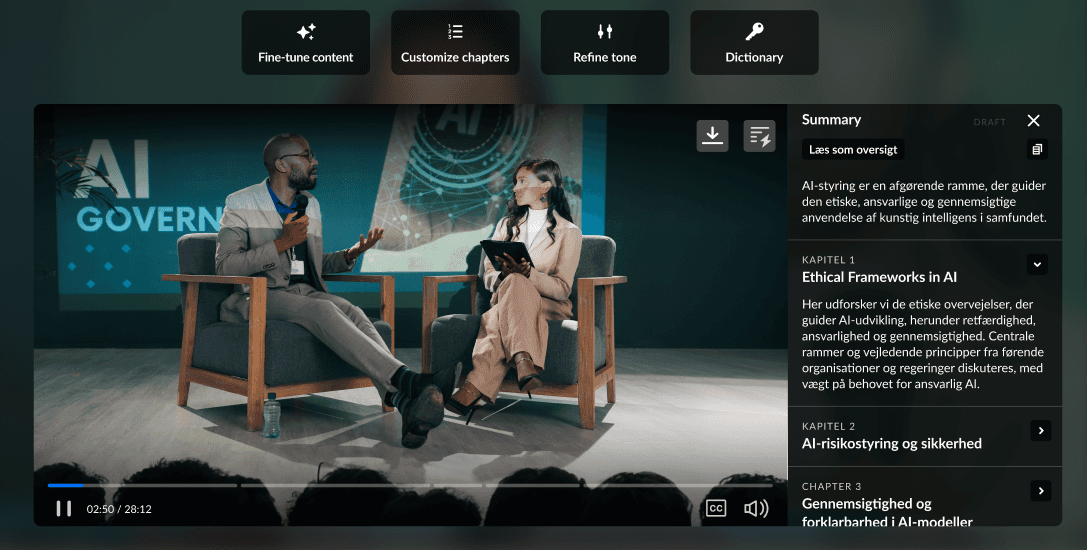
Challenge 3: AI Limitations vs. Expectations
💭 Brainstorm ideas
Full AI-based content rewriting
Group related actions together (e.g., Edit, Delete, Publish)
Smart content refinement and personalization using AI
❌ Not Selected & Why:
Full AI-based content rewriting: too risky in terms of accuracy
Real-time AI assistant: added complexity, not aligned with workflow
👍 Selected Solution:
Smart content refinement and personalization using AI
👍 Selected Solution:
Challenge 3: AI Limitations vs. Expectations
💭 Brainstorm ideas
Full AI-based content rewriting
Group related actions together (e.g., Edit, Delete, Publish)
Smart content refinement and personalization using AI
❌ Not Selected & Why:
Full AI-based content rewriting: too risky in terms of accuracy
Real-time AI assistant: added complexity, not aligned with workflow
Smart content refinement and personalization using AI
Prototype


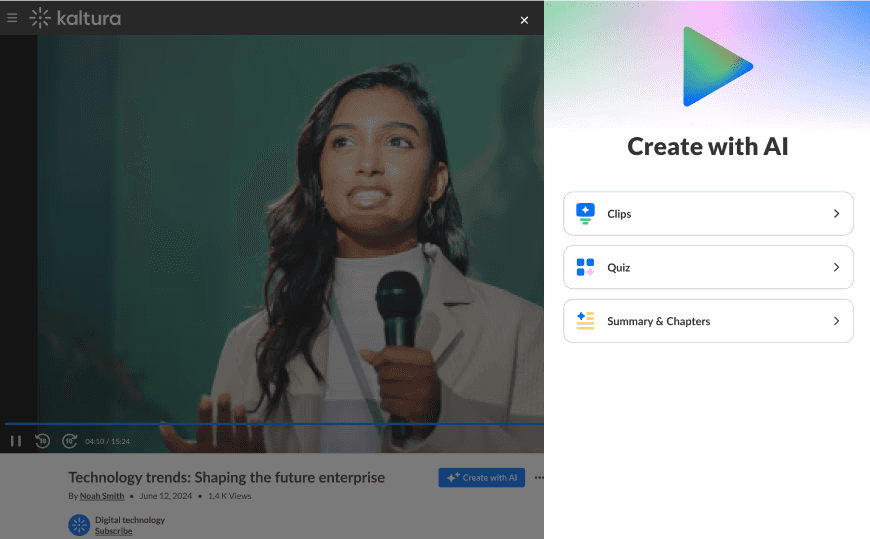



Prototype
Let's Connect
stavofek565@gmail.com
054-4468426